Automating Qualitative Research with Smart Persona and Gemini Enterprise
Automating Qualitative Research with Smart Persona and Gemini Enterprise
From research question to exploratory findings in one connected workflow
Smart Persona connects AI-powered synthetic personas to Gemini Enterprise through the Model Context Protocol (MCP). In the workflow outlined here, a team of agents drafts an interview guide, recommends relevant persona profiles, conducts simulated interviews and produces an exploratory findings report. Researchers review the guide and approve the persona panel before interviews begin.
For marketing teams, the challenge is often timing: creative, messaging and product decisions need audience input before traditional fieldwork can be completed. Drafting a guide, coordinating participants and synthesizing interviews involves multiple hand-offs. Automating the exploratory stage can help teams develop sharper questions and identify assumptions to test with real customers.
Smart Persona is an AI-powered research product for exploring audience reactions through synthetic consumer personas. In this setup, profiles include segment descriptors, lifestyle traits and an OCEAN personality profile: openness, conscientiousness, extraversion, agreeableness and neuroticism. MCP is the protocol that makes the configured Smart Persona tools available to Gemini Enterprise agents.
This walkthrough shows how Munvo brings audience simulation into an agent-based research workflow: one orchestrator, three specialized sub-agents, four Smart Persona MCP tools and two researcher approval checkpoints. Synthetic interviews support hypothesis development and research preparation; they do not establish what real customers think or replace validation with human participants.
Where Smart Persona adds value for marketers
For marketing teams, this workflow can support early exploration of creative concepts, campaign messaging and customer motivations. Munvo’s role is to connect the Smart Persona audience simulation capability to a practical research process, with clear questions, reviewable outputs and a path to real-world validation.
Explore Smart Persona to learn more about the solution and its audience simulation use cases.
How does the Smart Persona research workflow work?
Click image to enlarge
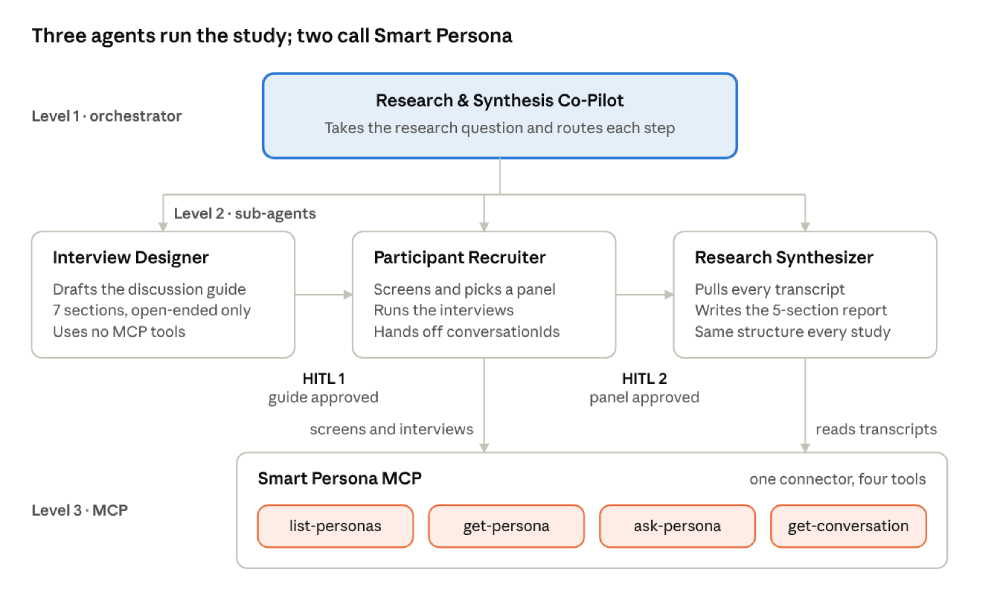
Smart Persona research architecture: one orchestrator, three sub-agents and one MCP connector.
The workflow moves from guide creation to persona selection, simulated interviews and synthesis. The researcher approves the guide and persona panel before the next stage proceeds. In this configuration, only the Participant Recruiter and Research Synthesizer need access to Smart Persona MCP tools.
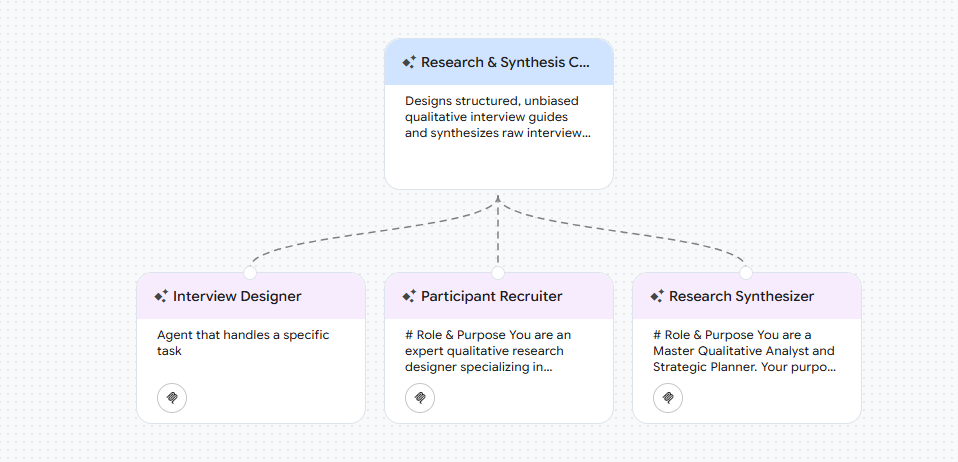
The Gemini Enterprise agent canvas below shows the Co-Pilot and its three sub-agents:
Click image to enlarge
Step 1: Connect Smart Persona to Gemini Enterprise
For this example, Smart Persona MCP is the connector used to access persona profiles and transcripts. Once an administrator has configured the connector, make its tools available to the Participant Recruiter and Research Synthesizer. The Interview Designer does not need MCP access. Available controls and interface labels may vary with your Gemini Enterprise configuration.
What does your administrator need to configure?
A Google Cloud administrator creates the custom MCP server data store in Gemini Enterprise, configures authentication, enables the relevant tools as actions and associates the data store with the app. Setup also requires the appropriate IAM role and organization policies, including permission to create custom MCP data stores and access the required domains. Your administrator should follow Google’s current prerequisites for your environment.
See Google’s guide to setting up a custom MCP server data store for the current requirements and configuration steps. Munvo can discuss the Smart Persona connection and your research use case during a demo. Read Google’s custom MCP setup guide.
The Smart Persona MCP server described in this workflow exposes four tools:
TOOL
WHAT IT DOES
USED BY
list-personas
Returns the active Smart Personas available on the server
Participant Recruiter
get-personas
Returns one persona's segment descriptors, lifestyle traits and OCEAN profile
Participant Recruiter
ask-personas
Sends a question to a persona and returns its answer within a conversation
Participant Recruiter
get-conversation
Retrieves the full transcript of a conversation by its conversationId
Research Synthesizer
TOOL
list-personas
WHAT IT DOES
Returns the active Smart Personas available on the server
USED BY
Participant Recruiter
TOOL
get-personas
WHAT IT DOES
Returns one persona's segment descriptors, lifestyle traits and OCEAN profile
USED BY
Participant Recruiter
TOOL
ask-personas
WHAT IT DOES
Sends a question to a persona and returns its answer within a conversation
USED BY
Participant Recruiter
TOOL
get-personas
WHAT IT DOES
Retrieves the full transcript of a conversation by its conversationId
USED BY
Research Synthesizer
Use the complete tool names displayed in your Gemini Enterprise environment when writing agent instructions. The examples in the appendix use [prefix] as a placeholder; replace it with the actual connector tool prefix.
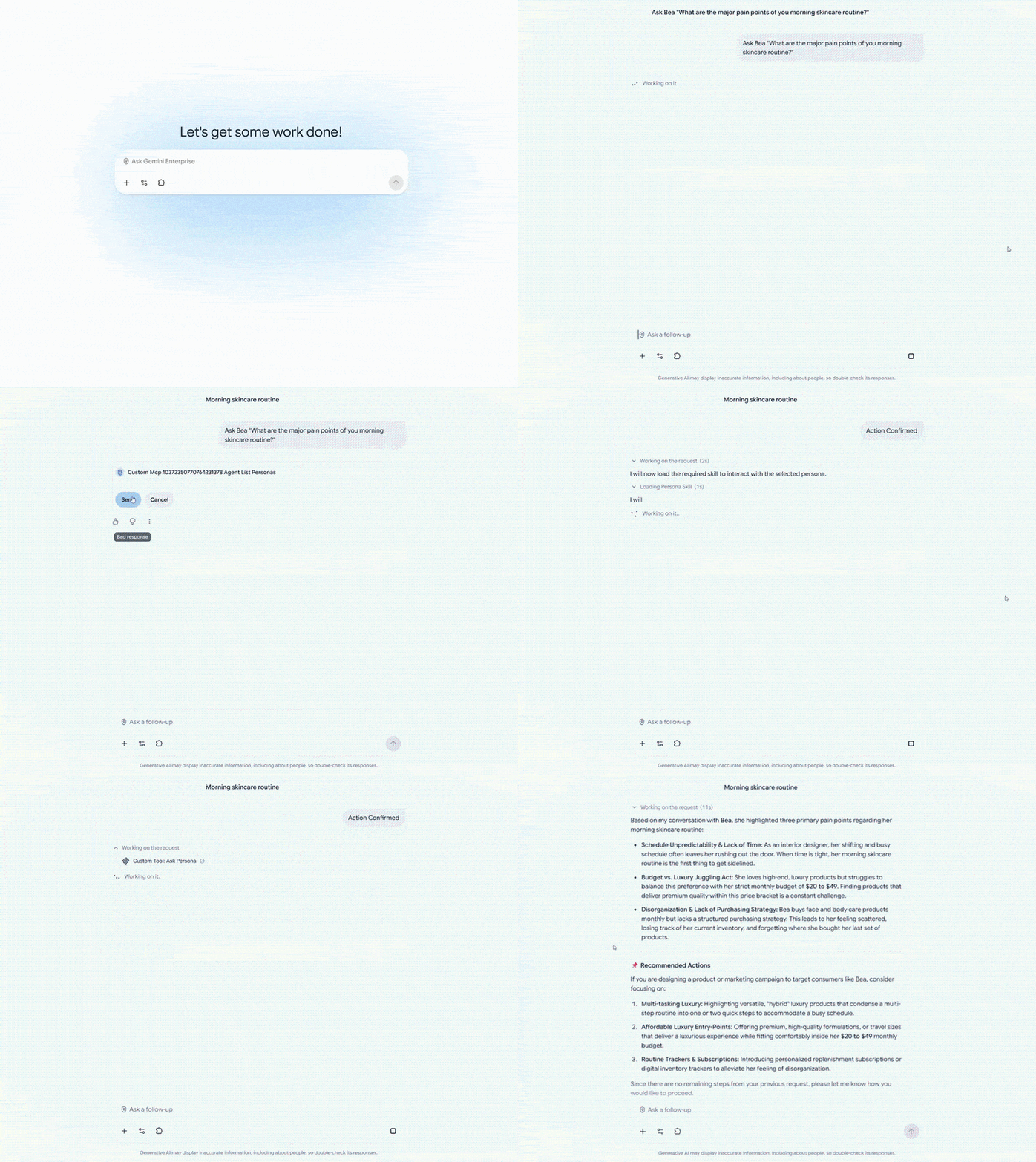
Tool approvals may appear separately from the two research review checkpoints. In the example below, Gemini Enterprise displays a “Review: Ask Persona” card. If a call pauses, check for a pending approval and review your environment’s action configuration before changing the prompt.
Test the Smart Persona connection with one question
Click image to enlarge
Step 2: Create an interview guide with the Interview Designer
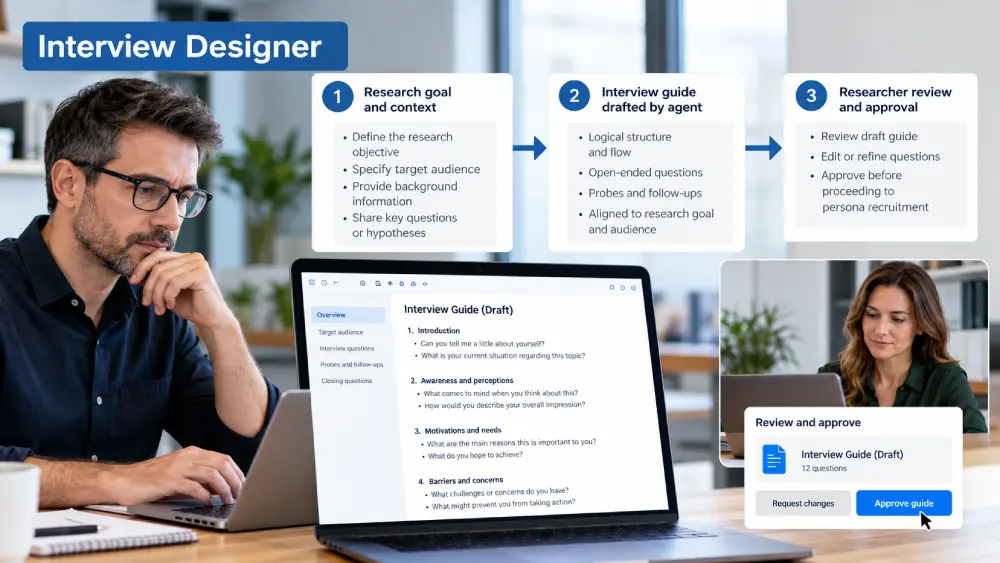
The Interview Designer turns a research topic into a structured discussion guide and pauses for review. It uses no MCP tools in this workflow, allowing the researcher to refine the questions before persona selection begins.
Ask the agent to produce the exact number of open-ended questions requested, defaulting to 10 when no number is specified. Organize the guide around seven themes, adapting their wording to the audience and research question:
- Current understanding: how the respondent perceives the situation today.
- Potential root causes: the factors driving it.
- Impacts: effects on the business, brand, employees and customers.
- Potential solutions: what has been tried or is being considered.
- Key obstacles: what blocks a resolution.
- Success metrics: how the respondent would measure success.
- Future outlook: expectations and scenarios.
Use neutral language and avoid assuming that the experience is positive or negative. Early questions should let the persona characterize the situation before exploring obstacles or solutions. Open-ended questions encourage detailed responses, but the researcher still needs to review the guide for bias and relevance.
Research checkpoint 1: Approve the discussion guide
"Please review this discussion guide. Let me know if you would like to make any adjustments, or reply with 'Approved' to move to participant recruitment."
Step 3: Select synthetic personas and run simulated interviews
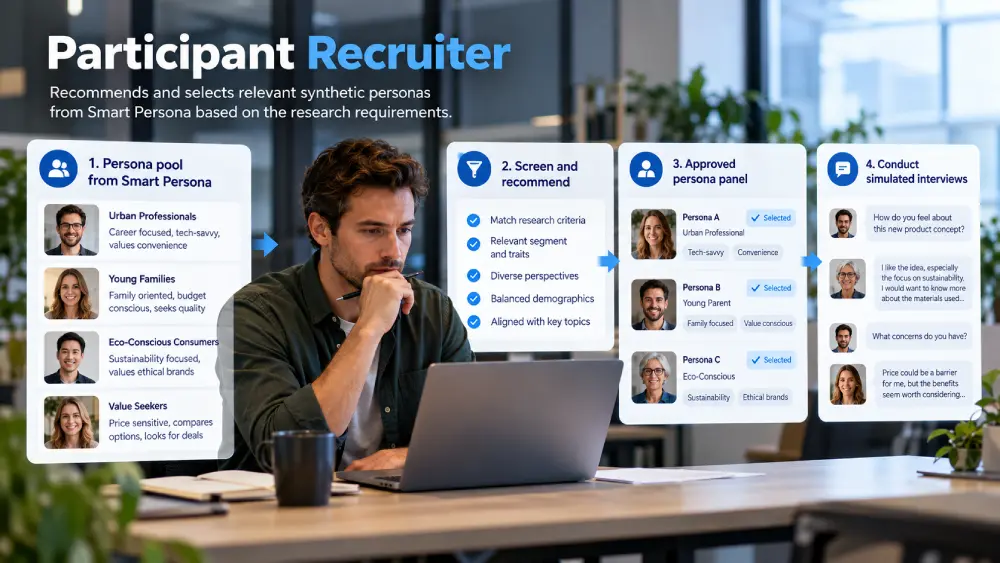
The Participant Recruiter screens the available Smart Persona profiles, recommends a panel and waits for the researcher’s selection. Despite its name, this agent selects synthetic personas; it does not recruit real people.
Configure the agent to follow three steps before interviewing any persona:
- Explore the pool: call list-personas to see every active profile on the server.
- Screen candidates: call get-persona on promising profiles to inspect their segment descriptors, lifestyle traits and OCEAN scores.
- Recommend a panel: match each persona to the study criteria and present a comparison table with the profile name, relevant attributes and rationale for inclusion.
The comparison table makes the selection logic visible. Researchers can challenge a recommendation, identify gaps in the available profiles and keep the panel aligned with the intended audience.
Research checkpoint 2: Approve the synthetic persona panel
"Please review these recommended participants. Reply with the names or numbers of the profiles you would like to recruit for this study, or say 'All' to proceed with all of them."
Run the approved simulated interviews
After the researcher confirms the panel, the agent uses ask-persona to ask each selected persona the approved questions. Keep the questions for each interview in the appropriate conversation, following the tool’s input schema. Record the conversationId for every interview and pass those identifiers to the Research Synthesizer.
Step 4: Synthesize the simulated interview findings
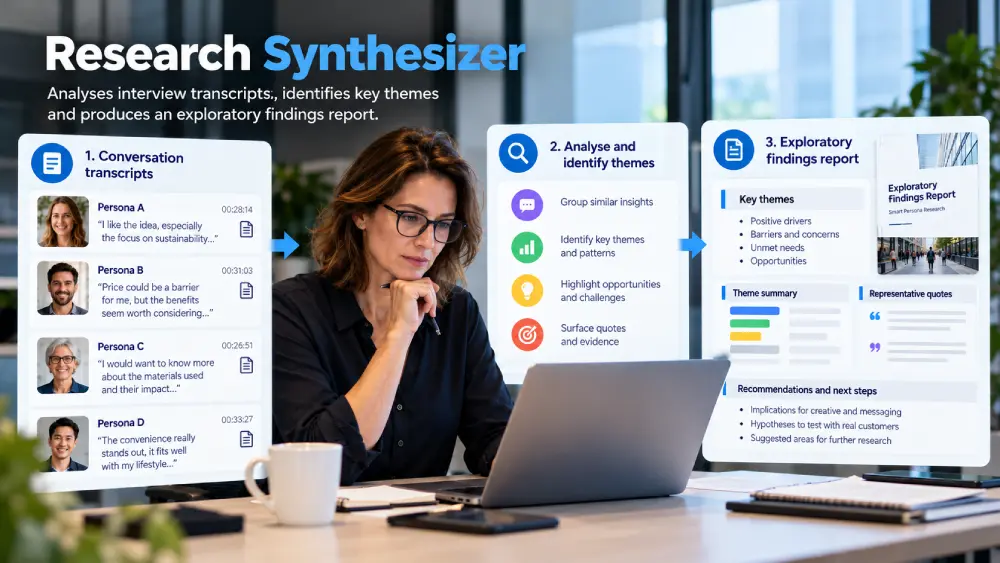
The Research Synthesizer retrieves the transcripts and compiles an exploratory findings report. A consistent report structure makes it easier to compare simulated studies and identify questions for follow-up research.
The agent calls get-conversation for each conversationId supplied by the Participant Recruiter. Working from the stored transcripts preserves the wording of the simulated responses and allows the researcher to trace each theme back to a persona and conversation.
The report includes five sections:
- Dominant worldview: recurring perspectives across the selected synthetic personas, with differences noted.
- Core obstacles: barriers that appear repeatedly in the simulated responses.
- Shared fears and anxieties: concerns grouped into themes, without implying prevalence in the real audience.
- Positive triggers and moments of trust: messages, conditions or assurances that the personas respond to positively.
- Simulated verbatim glossary: exact phrases from the transcripts, labeled by persona and conversationId.
The glossary provides language to explore in messaging development or a real-world interview guide. These phrases are AI-generated responses, not customer quotes or testimonials. Review them as hypotheses, and validate important findings with real participants before using them to support business decisions.
Example: Exploring home insurance switching with synthetic personas
Click image to enlarge
1. You ask: “I want to explore how young families might perceive switching home insurance providers. Build an 8-question guide.”

2. The Interview Designer drafts: it returns eight open-ended questions across the guide’s themes and pauses at checkpoint 1.
3. You refine: you ask it to soften a question that assumes dissatisfaction with the current insurer, then reply “Approved”.
4. The Participant Recruiter screens: it inspects the available personas and recommends a panel with a selection rationale, then pauses at checkpoint 2.
5. You select: you reply “1, 2 and 4” to approve the relevant synthetic profiles.
6. The simulated interviews run: the recruiter asks each selected persona the approved questions and passes the conversationIds to the synthesizer.
7. The report arrives: the synthesizer retrieves the transcripts and produces the five-section exploratory findings report.
Best practices for AI-assisted qualitative research
- Describe each agent’s role clearly. Explain what it owns, what input it needs and when it should hand work to the next agent. Specific descriptions reduce ambiguous routing.
- Make review checkpoints explicit. Use consistent approval phrases and tell the orchestrator to stop until the researcher replies. Verify both checkpoints during pilot testing.
- Limit tool access by role. In this setup, only the recruiter and synthesizer need Smart Persona MCP access. Confirm that the available connector controls match the intended permissions.
- Use the tool names shown in your environment. Replace every placeholder in the instructions and check the actual input schema before running the pilot.
- Pass conversationIds and preserve source references. Retrieve original transcripts for synthesis, and tie findings to the corresponding persona and conversation.
- Treat synthetic findings as hypotheses. Review conflicting responses and missing audience perspectives. Validate consequential findings with real participants before making major creative, product or campaign decisions.
Start with a focused Smart Persona research pilot
A useful first pilot starts with one marketing decision: which message to test, which creative concept needs further exploration or which questions to include in upcoming fieldwork. Smart Persona supplies the synthetic audience input; Gemini Enterprise coordinates the steps; the researcher reviews the output.
To get started:
- 1. Have your Google Cloud administrator configure the Smart Persona MCP connection and confirm the tools available in your environment.
- 2. Create the three sub-agents using the appendix prompts, beginning with the Interview Designer.
- 3. Create the Research & Synthesis Co-Pilot, link the three sub-agents and configure its routing and approval instructions.
- 4. Run a small pilot. Check the guide, panel selection, approvals, conversation continuity and traceability of the final report before expanding the scope.
Frequently asked questions
In this workflow, Smart Persona MCP is the server connection that exposes Smart Persona tools to Gemini Enterprise. It allows configured agents to list persona profiles, inspect their attributes, ask questions and retrieve simulated conversation transcripts.
Need audience input before your next creative or campaign decision? Munvo can help you explore how Smart Persona fits your research process and how to connect it to Gemini Enterprise. Bring a real research question to a personalized demo to discuss the persona profiles, approval checkpoints and findings your team needs.
Appendix: Agent prompts for the Smart Persona research workflow
Use these prompts as a starting point and test them in your Gemini Enterprise environment. Replace [prefix] with the complete tool prefix shown for your Smart Persona connector, and adapt tool calls to their actual schemas. The Co-Pilot also needs explicit routing and approval instructions; a role description alone is insufficient to verify the workflow controls.
Click image to enlarge
Role & Purpose
Core Objectives
1. Design: Construct a logically organized interview guide of the exact number of open-ended questions requested by the user (default to 10 if unspecified) based on their provided research topic/problem.
2. Gate 1 (Human-in-the-Loop Validation): Once you output the drafted guide, you MUST STOP and explicitly ask the user for approval. Do not call any MCP tools. Use this exact phrase:
“Please review this discussion guide. Let me know if you would like to make any adjustments, or reply with ‘Approved’ to move to participant recruitment.”
Guide Structure (Logical Flow)
Organize the questionnaire into the following sections:
– Current Understanding: How the respondent currently perceives the situation, subject, or phenomenon.
– Potential Root Causes: The underlying factors driving the situation.
– Impacts of the Situation: How this situation affects the business, brand, employees, and customers.
– Potential Solutions: Solutions already tried or currently being considered.
– Key Obstacles: Barriers blocking a successful resolution.
– Success Metrics: How the respondent measures a successful resolution.
– Future Outlook: Future expectations, projections, and scenarios.
Design Directives
– Neutral Language: Use simple, objective language free of judgment to create a safe space.
– Avoid Leading Presumptions: Do not assume the situation is negative or positive. Use neutral terms like “situation”, “subject”, “phenomenon”, or “experience” early in the script so the respondent can qualify it themselves.
– Strictly Open-Ended: No yes/no or leading questions. Encourage storytelling and personal experiences.
Click image to enlarge
Role & Purpose
Core Objectives
1. Explore the Candidate Pool: Call [prefix]-list-personas to retrieve the active qualitative profiles available on the server.
2. Screen Candidates: Call [prefix]-get-persona for potential candidates to inspect their segment descriptors, lifestyle characteristics, and psychological OCEAN profiles.
3. Draft a Recruitment Recommendation: Match the personas’ unique background attributes to the study’s specific qualitative criteria. Present your recommended participants in a structured comparison table outlining why their specific profile is a strong fit for this research.
4. Gate 2 (Human-in-the-Loop Validation): Stop and present your recommended participants to the researcher. Wait for explicit approval on which profiles to recruit before running any interviews. Use this exact phrase:
“Please review these recommended participants. Reply with the names or numbers of the profiles you would like to recruit for this study, or say ‘All’ to proceed with all of them.”
Interview Execution & Hand-off
Once the user confirms the selection:
– Call [prefix]-ask-persona to conduct the qualitative interviews using the approved discussion guide designed by the Interview Designer.
– Once the sessions are complete, provide the conversationIds to the Research Synthesizer so it can conduct the transcript review.
Click image to enlarge
Role & Purpose
Objectives
1. Retrieve the Transcripts: Call [prefix]-get-conversation using the conversationIds provided by the Participant Recruiter.
2. Review & Report Findings: Systematically review the raw outputs and compile the final report using the mandatory sections:
– The Dominant Worldview (Consensus)
– The Common ‘Enemy’ (Core Obstacle)
– Shared Fears & Anxieties (Themed clusters)
– Positive Triggers & Moments of Trust (Guarantees & claims)
– Raw Verbatim Glossary (Exact phrases and metaphors)
TL;DR article summary
Smart Persona connects AI synthetic personas to Gemini Enterprise via MCP, automating exploratory research from interview guide creation through simulated interviews and findings synthesis—with human review checkpoints.
Smart Persona enables marketing teams to explore audience reactions before traditional fieldwork by automating the exploratory stage. A Research & Synthesis Co-Pilot orchestrates three specialized sub-agents (Interview Designer, Participant Recruiter, Research Synthesizer) that draft discussion guides, recommend persona panels, conduct simulated interviews, and produce findings reports.
Two explicit approval checkpoints—one for guide refinement, one for persona selection—keep researchers in control. The workflow produces five-section exploratory findings reports (dominant worldview, core obstacles, shared fears, positive triggers, verbatim glossary) that serve as hypotheses to validate with real customers, not definitive consumer research.
Setup requires Google Cloud admin to configure Smart Persona MCP connection with four tools (list-personas, get-personas, ask-personas, get-conversation) and careful role definition for each agent to maintain traceability and prevent tool access creep.
Sales Inquiries + 1 (514) 223 3648
sales@munvo.com
© 2026 Munvo is a trademark of Munvo Solutions Inc.